Meet ScribeLM
A private, AI‑enabled knowledge workspace.
Think in connected notes and write in a real editor. Read and mark up your documents, plan your day, study until it sticks, listen on the go. And ask the AI anything, because it has read your library. It runs on your computer, in plain files you own.
Free for Windows, Mac, Linux, iOS and Android. First release is days away.
What it does
Ask it, study it, hear it, see it.
Ask
Ask your library anything
Chat with one note or everything you have ever saved. Every answer cites the exact note it came from, one click away.
Write
Make your writing better
Fix grammar, tighten, change the tone, translate, or summarise any selection. Changes appear side by side, and you keep only what you like.
Study
Study until it sticks
Flashcards and quizzes made from your notes, brought back at the right moment so they stay learned. Study guides, cheat sheets, and practice exams too.
Read
Read and mark up your documents
Open PDFs, Word, and Excel files. Highlight and comment without ever changing the original, or turn any document into a note you can edit and ask about.
Plan
Plan your day where your notes live
Any note can become a task board. Plan the day on a timeline, run focus sessions, and park distracting thoughts without losing them.
Listen
Hear everything you save
Notes read aloud in natural voices, whole folders turned into podcast-style audio overviews, and dictation in 25 languages when you would rather speak than type.
Think
See your ideas side by side
An infinite canvas for visual thinking, and a library that finds broken links, duplicates, and notes going stale, so what you know stays trustworthy.
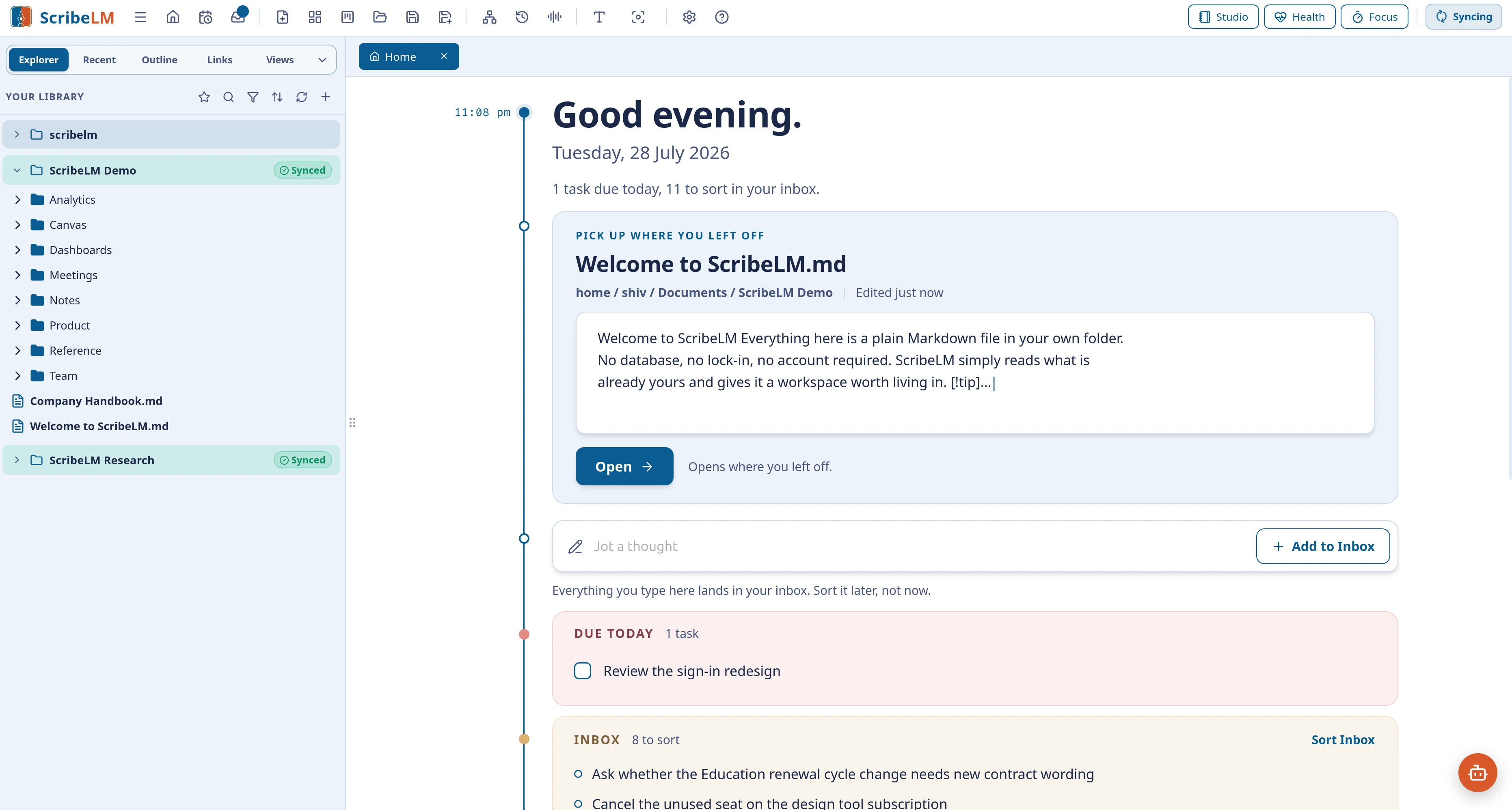
The real thing: Home greets you with your day in one calm view.
On your phone too
Your pocket copy.
ScribeLM for iPhone and Android: capture a thought the moment it arrives, study the cards due today, and keep listening on the way. Synced and sealed, readable only by you.
Sync coming soon
Study
Turn lectures, readings, and your own notes into flashcards, quizzes, and a tutor that asks you one question at a time.
Work
Briefings, meeting summaries, action plans, and decision memos, drafted from what you already know.
Think
Link ideas, hear them read aloud, find the gaps and contradictions, and watch your understanding grow.
Life
Recipes, plans, journals, and the family admin: captured in a moment, found in a moment, read back to you on the way.
Your notes stay on your computer. Nothing leaves unless you ask it to.
The AI, the voices, the search: all of it runs on your machine. Cloud AI exists only if you bring your own key, and it stays off until you do. No account, no telemetry, and notes that are plain text files in your own folders, readable with or without ScribeLM, forever. Turn on Sync and those notes are end-to-end encrypted, sealed with a password only you hold.
Fair questions
Everything you might be wondering.
The app
Do I need an account?
No. The app never asks for one. Only Sync, if you choose it, asks for an email address, because it has to know whose notes to carry.
Does it need internet?
No. The AI, the search, the voices: everything works offline. Only Sync and the optional bring-your-own-key cloud features need a connection.
Do I need a powerful computer?
No. ScribeLM checks your computer and recommends an AI model that suits it. Smaller models run happily without any special graphics card.
Can it read my PDFs and Word files?
Yes. Open them, highlight and comment on PDFs without changing the original, or turn documents into notes you can edit and ask about.
What if I stop using ScribeLM?
You lose nothing. Your notes are ordinary files in your own folders, readable with or without ScribeLM, forever.
Is my writing used to train AI?
No. ScribeLM collects nothing and trains nothing. The built-in AI runs on your machine. If you choose to connect a cloud AI with your own key, what you send goes directly to that provider, under their terms, and never through us.
Can I use my own AI provider?
Yes. Bring your own key for OpenAI, Anthropic, Gemini, OpenRouter, or another compatible provider, and add Brave web search for current information with cited sources. Both are optional and off by default.
Sync and paying
What does it cost?
The app is free, and not as a trial: it is simply free. Sync, which carries your notes between devices, is $39 a year or $3.99 a month.
What happens if I stop paying?
Your notes stay on every device you synced. They are your files. Syncing new changes stops, nothing is taken away.
Can you read my synced notes?
No. Notes are sealed with a password only you hold before they leave your device. Not even we can open them.
What if I forget my password?
Set a new one from any device that is still signed in, and nothing is lost. If no signed-in device remains, the sealed copies on our servers are erased so you can start Sync afresh; the notes on your own devices stay untouched.
Is there a phone app?
Yes: ScribeLM for iPhone and Android, for capturing thoughts, studying your flashcards, and listening on the go, alongside the desktop app for Windows, Mac, and Linux.